Sunday, 26 June 2016

Thought for the Day

It is my way to write down in a journal my thoughts when I'm moved to do so. I have a number of headings to these thoughts, but one such is "thought for the day". As I approach 4 years without Anita I thought I'd share one such thought with you.

What was and what is and what is only in memory.

Its easy to live in the now and be unbound to the past. However living that way brings reactions to things and fears from half remembered things which are twisted in memory by the inaccuracies of human memory.

To live in the past and have all actions dictated by what was is fraught with an inability to move beyond that point, stuck in an arrested development, held ransom to nostalgia or some other manifestation.

The question is how to live with what was and what is and yet move forwards to adapt to and enjoy what comes. It becomes more profoundly difficult when that encompasses the loss of ones you love. I write the word in the sense of present continuous not past, because in many ways that love is undying. Sure, some people love and forget and move one .. sometimes its due to completion, sometimes its due to growth in their "self" to realise that maybe they didn't love that person, but were projecting a desire to love onto that person because they (quite simply) were there.

For the grieving person living with the reminders of that love makes living hard. These reminders may be the house you build together, the places you visited together or even the scars on your body of things you went through together. So not all can be discarded even if you wanted to.

Though it has been nearly 4 years I struggle with the absence, with the feeling of love that is not possible to be returned. For if I loved someone from afar who never returned my love that would be quite different to having been together in love and without any trauma or fight to be a breakup, with only the daily evidence of it getting better with much more to happen as we aged together to lose that in a single sudden stroke is hard to comprehend.

Humans are designed to be able to carry trust and love for many years , I would argue that from our earliest nomadic times such things were amplified by the evolution of who we are. So I can not forget Anita and the love for her, even though my intellectual brain knows that I'm not just "working away from her, to return later in the season".

Perhaps I will return ... either way I will only know when I die. At that point in time my knowledge will perhaps never be complete (if death is simply the end).

So I remain dogged by who I was designed and shaped into being by evolution of my species, dogged by a beautiful thing - a love shared with a beautiful spirit.


I hope you never truly know what it is that I'm talking about.

Monday, 20 June 2016

Oppo F1 - HDR mode further explored

important "pre" POST SCRIPT:


this morning I took a photo off the balcony which I put the camera into HDR and I got an interesting shot, I say interesting because I took two shots and attempted to make a proper HDR. In doing this assembly, I found that there were actually interesting artifacts in one image image which is familiar to anyone who makes HDR images by hand ... movement artifacts. To Wit:


the double image or "ghosting" of the wires, and support and the birds is quite similar to image overlay artifacts. You may note that I had to zoom in in my viewer to 214% to make them clear, but to me they seem to match the "pattern" I know so well. This suggests to me that it may actually be taking 2 or more images and blending them ... which would also explain the oddness I find below with the ISO as it may be recording only the lower of ISO's used in taking two images. This is because ISO shift is another method (shutter speed is the other) for gaining the two exposures. If you take two images and combine them what do you do with the data of each? Usually ignore it, or perhaps use one of them.

More Testing Needed

So now later in the day more testing is done: I've taken a shot in full sunlight (to force a high shutter speed) of a friend rapidly moving his hands. That should test any HDR algorithm that composites 2 or more images as this will reveal movement ghosting were it present.


Now, examining that image carefully I found just such a ghosting artifact over on Kevs left hand:


So this answers the question of "is the Oppo HDR a proper HDR" ... yes it is.

To be clear the image above has sufficiently high shutter to preclude "motion blur" with the speed that Kev can move his hands at:
Filename - IMG20160621100231.jpg
Make - OPPO
Model - F1f
ExposureTime - 1/1503 seconds
FNumber - 2.20
ISOSpeedRatings - 100

What it doesn't solve is why a tone mapped single image from a RAW file actually gives a better result ... except to say that the JPG writing engine on this phone is crummy.

Eg from my earlier post:

Standard JPG


HDR :


processed RAW (taken as RAW + JPG on the first exposure):


So HDR is a big improvement over the standard JPG, but you know it could be much better, it could be as good as Snapseed made from a single exposure.

Why Oppo? Why cripple your camera module with this crappy JPG engine.

The rest of this post now serves to show what benefits you can get from using HDR mode in many situations, for most owners will be barely wanting to even engage another mode like HDR, let alone bugger about with RAW and have an app like Snapseed on their phone (or drag it across to their PC and edit it there).


carrying on from my previous post on this topic I thought I'd put the Oppo on a support and without it moving take two shots in identical light to answer the question of:
That could be part of the algorithm or it could just be that it "picked differently" due to slightly different composition ...
So forgive my lack of foreplay and lets just get to it. So with the phone on the support I took these two shots. The left is "default" and the right is HDR


I know which one I prefer ... now, as I did nothing more than trigger the shutter button, change mode and again trigger the shutter button. They are both "undisturbed" and identical compositions, the differences therefore are down to the algorithm chosen as a result of the camera programming.

Lets look in more detail, top left corner:


where I see not only brighter, but more smudging from noise reduction algorithms. But...


better contrast and details on the HDR, but


slightly more "oversharpening" on the text on the HDR. Interestingly the wood textures came out better on the HDR

Yet, whites were unsaturated in either:


and if you ask me, the whites are better represented as whites (not greys as in the left hand "normal" image). When I did a course on photography many decades ago one of the early printing assignments (ohh, and we were using film and darkroom printing) was to photograph something white with texture and print it so that it looked white with texture still.

To my eye the right hand (the HDR) side looks better.

So lets look at the data from the EXIF:

Filename - IMG20160619175720.jpg  IMG20160619175704.jpg
...
ExposureTime - 1/10 seconds 1/10 seconds
FNumber - 2.20 2.20
ISOSpeedRatings - 2007 800


So the primary settings are the same, but ISO is about 1.5 stops higher on the "normal" shot when compared to the HDR shot. Since the shutter speeds are the same, this should mean that the normal shot would be brighter than the "HDR" shot which it isn't.

So what's going on?

To answer this we need to get a little into the issues of ISO and dynamic range. Normally as you squeeze more sensitivity out of a sensor (IE increasing the ISO) what happens is that dynamic range (the total difference between floor noise and clipping) falls. This is well known.

So what this suggests to me is that default camera settings attempt to push up the ISO, and squeeze the sensor captured dynamic range into a tighter band which is more compatible with the dynamic range of JPG (which is restricted to 8 bits per channel).

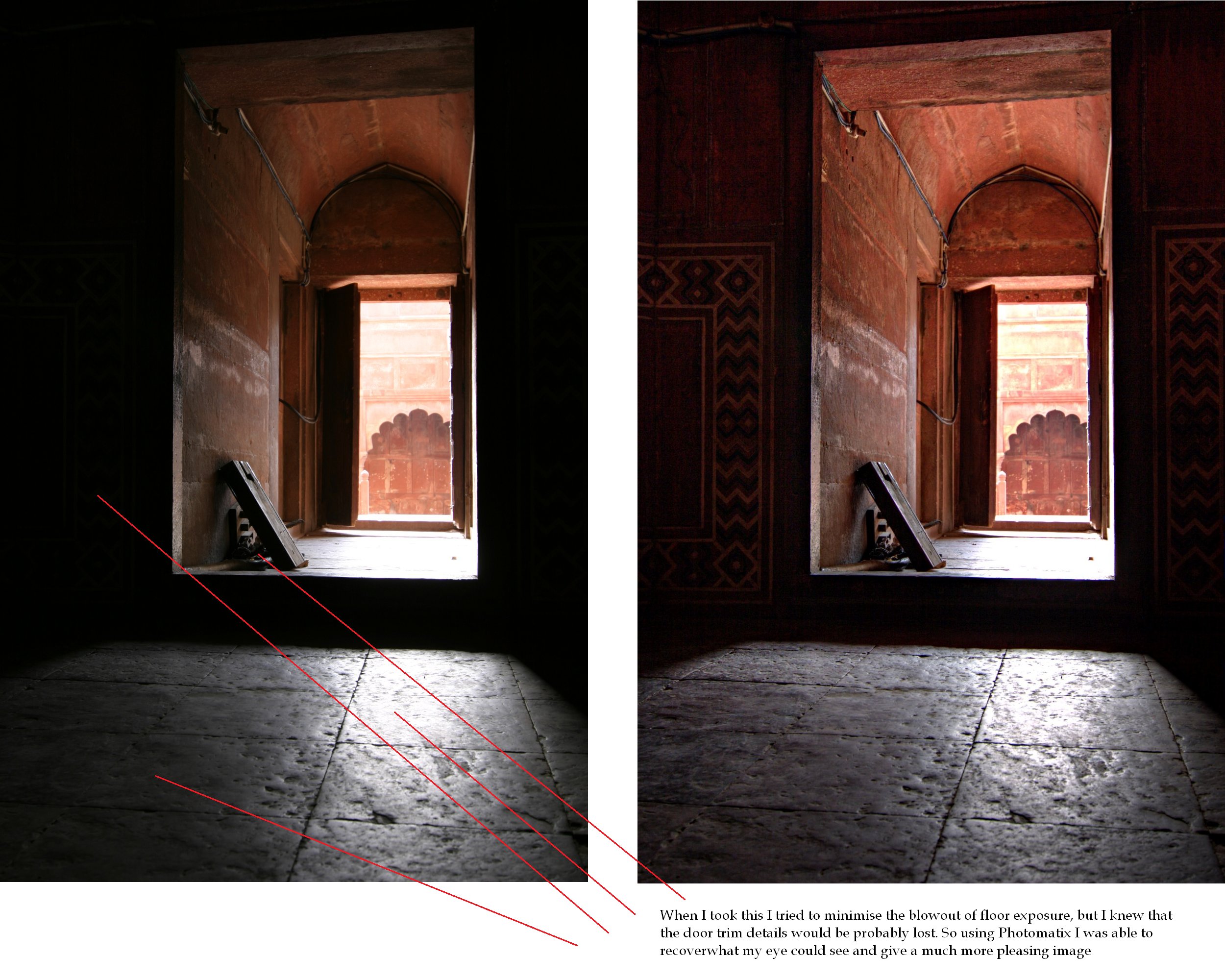
This image (taken with my 10D in India some years back) is a good example of what better software can make of a RAW file, which does not clip the whites and (by dint of being RAW) preserves the entire capture of data including the shadows. Note the better shadow details while maintaining the highlights

This is exactly what good software should do, to properly tonemap the RAW capture (often 12 bits) into the 8 bit space of the JPG ... the HDR mode on the Oppo is doing an acceptable job of this, but needs (it seems) two exposures to do it, while the standard software algorithm in the camera is not doing that very well at all.

The above shot from India was taken with the Canon 10D camera, which was introduced in 2003 ... so its no wonder that by 2009 when I used Photomatix on that same RAW image I was able to pull a "better" shot out of it.

What is less forgivable (or understandable) is why Oppo is shooting their own product in the foot before sending it out.

Clearly they have the HDR mode (because it was shipped with the phone),and clearly it does a better job of rendering a scene into a photograph.

Given that 90% of reviews don't have a clue, and 90% of buyers don't fiddle with settings, I have to ask: why the hell isn't this the standard mode?

Now the question I posed in the "pre post script" at the top combined with these and previous findings raises some interesting questions.


  • now that we have established that HDR is taking more than one shot, why is it so bad?
  • given that the capacity of the RAW file from a single shot demonstrates that the camerahas enough details and dynamic range (here , here  then at the end here) then why is it doing such a bad job of the JPG when in HDR or Standard mode?


Are Oppo wanting to undercut their own product?

Myself I'd want audience reception to be great from day 1 ... not tepid and critical as I read on the web.

outtakes

For those of us who have the F1 and like to use our phones to take photographs I offer you this:

set HDR mode every time you take a shot (or if you're a fiddler use RAW as I've already shown how much better that is in the previous post).

Shalom

Saturday, 18 June 2016

Oppo F1 - HDR Mode

I remain a little unclear as to if this mode is worth a rats arse or not.

As I explore it more I'm learning to "ask the right questions" of my photographs to see.

This morning I took some shots which suggested that it didn't really do much, but this after noon I took some shots which suggested that it did.

The answer seems to lay in "how contrasty is the lighting"

So this afternoon while it was overcast I took this shot off the balcony:


and then (wasn't using the tripod) this shot engaging the HDR setting:

The HDR shot actually seems to just get around the cameras dreadfully bad habit of making the shadows look like you'd scared a squid, while doing little to the highlights. As one who's used HDR a lot myself this is most definately NOT taking multiple shots and combining them into a HDR. So its more or less just doing a better job of tonemapping the initial shot into something like a decent photograph.

I confirmed the same again in my bedroom taking a shot of the clothes in my wardrobe (also in dim light) and the HDR setting was better (on the right).


Again, whites nearly the same (lifted perhaps a little) and the reflection on the floor from the door shows curtain shadow better on the right, where its not just "nuclear white"


... The left shot seems to show more shadow noise, so if it had simply dropped exposure then you'd expect that the lower exposure would be noiser (which is the right), so perhaps it is actually giving a bit more than just holding the highlights and beefing up the shadows.

From the EXIF data:
ExposureTime - 1/17 seconds --- 1/20 seconds
ISOSpeedRatings - 1155 --- 800

so it chose a lower ISO on the "HDR" image (which would tend to darken the image, but improve noise) but a shorter exposure on the NORMAL image (which would also tend to darken the image, were it not balanced by the raise in ISO).

That could be part of the algorithm or it could just be that it "picked differently" due to slightly different composition ... I'd need to ask that question in my next test by fixing the camera and fixing the same "metering point" to remove that from the equation.

So you see that each time you take a test shot, the analysis of that outcome guides your exploration for the next iteration.

next I'd like to look at the HDR test from early this morning, when I saw clouds low over our mountain range here being illuminated by the newly rising sun.


again, that squid has squirted its all into the shadows ... and escaped with the shadow details!

So with HDR engaged:

we see the much better preservation of the shadows, without destruction of the highlights (which simply increasing exposure would cause). Seems to fit the pattern.

However what could I have got if I'd taken RAW and processed it with Snapseed on the phone (at the expense of a few moments, which could be done at any time later)?

Well cunningly I prepared for this at the time of taking the first photograph above by: setting RAW capture (which also captures the standard shot at the same instant, writing both the card).


So when I "developed" that RAW file I applied two simple tweaks:
  • pushed the exposure up a little
  • pulled the highlights down (which prevents the clouds from going nuclear)
and that gave a much more dramatic version, capturing the highlights, keeping the shadows and actually rendered the upper altitude clouds nicer against the sky - something the HDR mode failed at.

Conclusions
To my mind if you are in doubt at all, then engage the HDR setting ... I actually think that its what the camera should default to. I suspect even that the HDR setting is more or less what a decent algorithm for writing the JPG should produce, and they only have the crummy standard one to make the HDR appear to do anything.

Of course (as always) if you are even thinking that this is going to be a keeper ... engage RAW

:-)

Thursday, 16 June 2016

Oppo F1 night shot with "Expert Mode"

been waiting for a tripod mount (clamp) to arrive to test this out with a better result than hand held (which looked promising).

So this is a shot from my balcony well after sundown (looking North / North West). I cranked the ISO to 800 and the exposure time to 8 seconds


I'm impressed, with my eye I could barely make out any details in the bricks of the wall and the sky is of course not blue to my eye (although I've done other posts with my m43'rds camera to show that indeed the sky is blue at night with sufficient exposure).

Quite a satisfactory result!

I look forward to the next full moon to compare it to a shot taken some years back with my Nikon Coolpix


long exposure on a bigger pixel sensor