Showing posts with label Oppo F1. Show all posts

Sunday, 5 May 2019

Oppo R11s camera (portrait mode and low light images)

I thought I'd put this here because I find myself referring to these images (which I took as part of the earlier R11s comparison, but didn't include because the post was getting long) in other discussions I've had.

Summary

The camera system on the R11s (which is functionally the same as the OnePlus 5T) employs two cameras to do the job that the F1 does. It makes use of these cameras to give a bokeh effect and to assist in reducing picture noise in low light situations.

It does an impressive job at noise control in low light, but I can't say I'm fond of the "bokeh" effect. The boke effect is patently fake but will pass muster for non photographic people who only give it a quick look on Farcebook, Instacrap or Slapshat. The tons of rave reviews are either showing their utter ignorance or were paid to dribble nonsense.

There is a resoundingly stupid (channeling my inner John Cadogan) way of changing the aspect ratio of the camera (no, really).

Its still an excellent bit of hardware let down by the fools at Oppo in the software section (however given so few have long term (no, not 6 weeks, 3 years) experience with an Oppo as their daily driver I guess no one will know what they were missing (and why so many think McDonalds makes good food)

Poor-trait mode

Its important to state up front that details change when you take a portrait mode shot, the image size changes from 4068 x 3456 pixels to

  • 5184 x 3888 (in the "normal" portrait mode)
  • 3264 x 2448 (in the closer head and shoulder portrait mode)
weird isn't it ... because the only other way you get different dimensions of your image in pixels (and yes, it matters because the victims of marketing only ever seem to waffle on about how many megapixels the camera has, seemingly vacant and devoid of comprehension of what it even means or why its not the only metric) is to change how the phone shows the picture (red arrow).


Which weirdly in Full Screen crops the image down to a wide screen 2:1 aspect while actually keeping exactly the same long dimension (4608). It does not make the image any wider, just narrower (4608 x 2304). Aside from portrait there is no other way to get those extra pixels...

So lets look at a portrait mode image shall we?


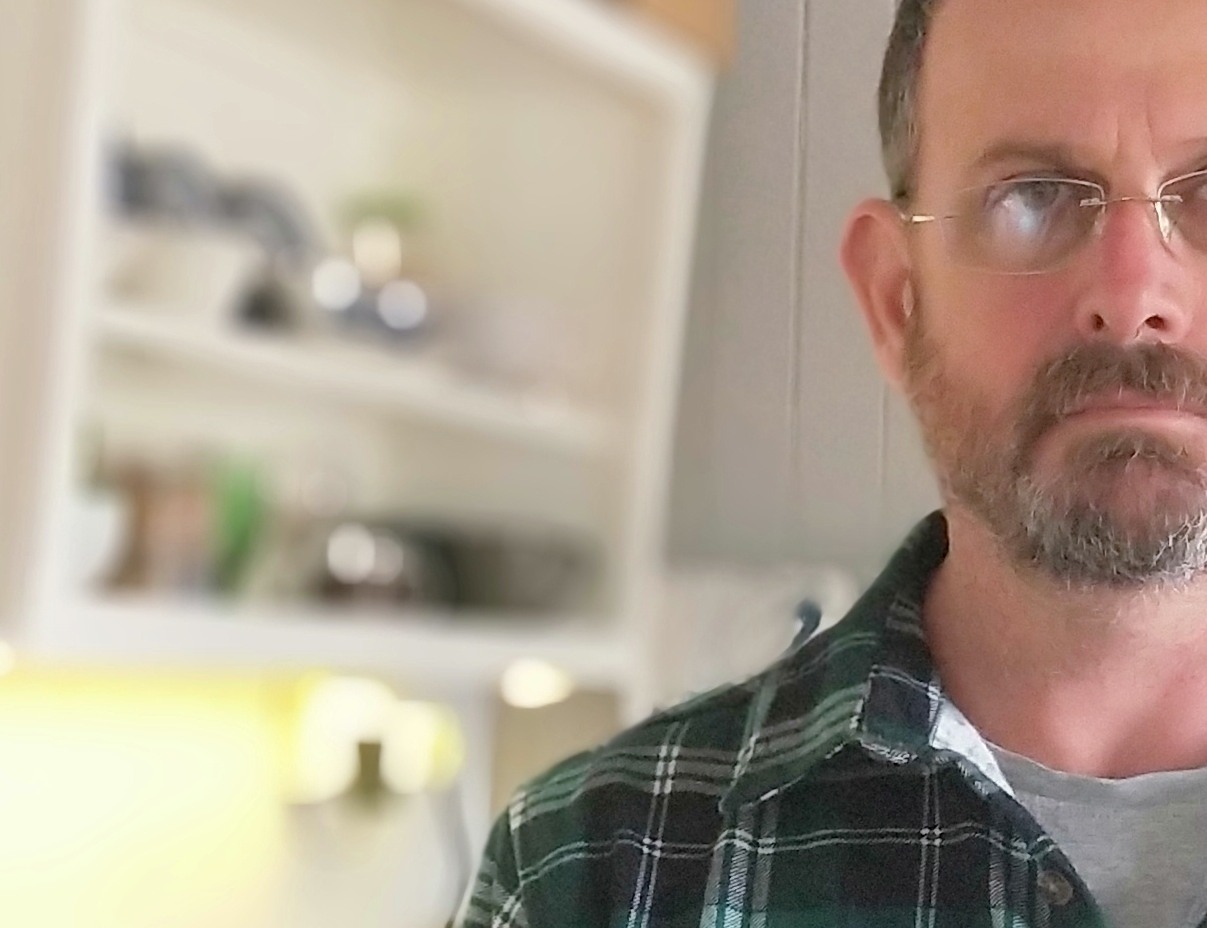
Now I've put this red halo around me to highlight my primary beef with this system: it makes mistakes in combination.

Note that the area above my (balding) head is left un-bokeh'd ? I wonder if this is a failure of the algorithm or indeed to account for "big hair" in the typical fluff-head who festers iconic tourist locations to grab a selfie or 2 (x 103).

If we were to recompose to carefully position my face at the edge of the frame I suppose we'd fix that.

Now its one thing for a photograph to be something you'd glance at on Farcebook (on a small screen) but its another to have a picture you took be something you'd want on your desk. So unless you only want a post card sized image (meaning you don't need 20 megapixels) you'l see this level of detail in the image.


which is crappy, pixel smeared (blame that heavy handed JPG processing I've complained about before) and has weird artifacts like my glasses, softening my beard and ear but not the boards behind me. So basically its a crap gimmick ...

Still for a quick glance (on your phone, not a print on your desk) for the "Slapshat generation" who only glance momentarily at your masterpiece,which you probably spent more time taking, trying different filters and generally gazing at yourself than anyone will looking at it, its probably just fine.

Myself I'll stick to  my real camera thanks. Chances are that if you're reading my blog you're a photograper anyway, but in case you aren't, here are some examples of what one can achieve taking a portrait looks like using a real (yet still quite compact) camera with a similar angle of view and a sensor size which brings many advantages to the photographer.



Yes, that's what shallow depth of field is all about ... its a matter of physics and its going to require a lot of AI smarts to replicate it. But why bother doing that when you can actually carry a real camera if you happen to be into photography?

Anyway, while you're obsessing over the question of "is 20 megapixels good enough or do I need more" you can look at the 20 the Oppo R11s produces and ask yourself "is that good enough for me".

Consider that the above camera (a nearly 10 year old Panasonic GF-1) is only 12 megapixels,  will set you back a puny $100 and be a lasting tool that will yield many excellent image especially in lower light. A real camera will show you what Depth of Field effect (note: not bokeh effect) can do. At the very least note the genuine and natural way that focus falls off with distance?

So now lets move onto the advantage (rather than the cheap gimmick) the camera has:

Low Light


This is one area that the dual camera shine at - low light (and wow, I wish it had RAW capacity, but probably that's asking a bit much when the 3 year older half the price F1 has that {right? lol}).

Now lacking OIS you'll need to have a tripod (and I doubt that OIS would be sufficient for these exposures anyway, but still).

Now the F1 does not have portrait mode (no loss IMO)  but it does have long exposure and ISO control in the manual settings as does the R11s, so we can directly compare them here.

I took this shot (scaled down for overview) with the F1


and  this one with the R11s


Now I gave the R11s an advantage by using its faster F-Stop (f1.7 but f2.2 for the F1) to allow it to use the same shutter speed (important for hand holding). This is an advantage because by using a slower ISO (1600 vs 3200), it can have less noise in the image. Looking at the above shows that:

  • they aren't exactly the same exposure (the F1 is brighter giving more foreground exposure) because f1.7 >> f2.2 is not a full stop, but three quaters of one. None the less this is significantly darker than just that, indeed I'd put it at at least half a stop or maybe even a stop
  • at these sizes the noise and image quality differences don't matter much
But again, if you've gone on a holiday and taken your prize shot of Rome at Night with the only camera you had (the phone), which you want to print big (like A4 or larger, and the R11s will yeild a print as large as 58.5 x 43.9 cm or 23.04 x 17.28 inches) then you'll be interested in the details.

So when peeking at the pixels, this is about the differences you'll see in a print


which is astounding and makes the R11s a superior camera.

Now its worth pointing out that this was a super extreme test, and to my eyes (and I have good night vision) the sky was barely observable as a glow and I could not see details on the ground. To even get sharpness in the shed I critically manually focused (which both will do, in the expert mode), AF shots were not as good in this low light with either camera. Still the amount of detail in the R11s is amazingly good for what it is. I wonder if it had RAW how much more I could get out if (as I know I can with the F1)

Bottom line: If I was travelling I'd be comfortable to have this camera with me for night shots. Yep its that good. Having said that the F1 has advantages in other areas and when I use RAW (which when I'm taking more than a snapshot I always do), so for a person even faintly serious about photography the F1 is still the better outfit.

Discussion

Why do Oppo continue to develop their phone hardware and yet also continue to degrade their phone software?

To me the R11s is a great camera system on a phone (for what one can reasonably expect), its sad to me that they've dropped many of the features from the camera software (like the Expert Mode seperable focus and metering, "Super Macro Mode" and RAW) but as I normally take my regular camera with me I'm not too worried.

The inbuilt HDR does a much better job than the HDR on the F1 (although not as good as the F1 does in RAW and using Snapseed see here), so I don't want to muddy this review up with that complex discussion but just to show how well the R11s does on the HDR mode.

Standard image:


and HDR engaged:


So much better preservation of highlights and shadows. to get that with the F1 I needed to use RAW and touch up in Snapseed;


which as it happens, is to me a more "natural" looking image, preserved highlights and appropriate shadow details, with (as observed in other posts) a slightly wider angle of view (which I appreciate).

But if you're a Pareto Principle sorta person (where you aim to get 80% of the benefits for 20% of the effort then the R11s camera offers much and is a (slightly unclear) development from what was offered 3 years ago in the F1.

Of course if buying new you have no choice (well and soon you probably won't be able to get a new R11s anyway as its last years phone), the R11s is a competent phone camera.

I'm as yet undecided if the R11s will become my daily driver for a number of reasons, these being:
  • the colour rendition of the R11s makes it seem punchier than it is, meaning others will see limp washed out images (which look good to you) (on a positive note, I can say that it has a much better rendition of the rgb gamut than almost any other screen does, so there's that)
  • lack of voice shutter trigger
  • I don't like the bigger phone to hold (and the reduction in bezel size makes for touch errors)
  • less control
  • no RAW
However as I normally also travel with a GF-1 and a couple of lenses some of this is moot.

In its favor the R11s's faster processor means I can process RAW images from my proper camera in much less time. For instance I did a comparison with my Sony A7 cameras raw files and found this for transferring and converting 3 ARW files:

R11s
Transfer speed = 12mbs
3 ARW file conversion = 17.46 sec
Snapseed conversion
Open time = 4sec
Processing = 9.4sec


F1
Transfer speed = 10mbs
3 ARW file conversion = 34 sec
Snapseed conversion
Open time = 4sec
Processing = 32sec

Processing time was less of a "oh my god, I'm getting another beer" event when using my Panasonic GF-1 (because its a 12Megapixel camera and the Sony is 20Megapixels ... and more pixels means a longer time)

Lastly I'll leave you with a shot taken with my GF-1 but not used in the previous comparison (here) of phone and camera cameras


its why I keep using a camera, although its nice to have "much better than nothing" in my Phone.

Wednesday, 17 April 2019

Oppo R11s explorations

To those unfamiliar with the R11s I recommend starting at this page: https://www.oppo.com/au/smartphone-r11s/ for a general advertising tilt. If I can say a single phrase which summarises this post its this:
no matter how good the hardware is, it's only as good (or bad) as the software.
Oppo (and their sister company OnePlus) make some great hardware ... OnePlus makes great phones, Oppo sometimes does.

Some time ago (2016) I bought an Oppo F1 and its been my daily driver since then (and actually still is). While I'd had a number of Android tablets (and used a few iPhones and iPads too) before getting it my daily driver until the F1 was my Nokia E-72, which still works and is still me "spare sim" phone that I have on every day for my "other" sim, as well as literally being the better bluetooth capable MP3 playing device that I connect to my stereo or speakers. A fairly amazing service from a 2009 phone, but I digress.

The R11s is basically a OnePlus 5T with a slightly down spec processor and a bit less RAM (both system and storage) and a different "OS Skin" over Android, which costs less. You can compare them over here on GSMArena (link). To the spec cognoscenti it would seem that the F1 would be substantially left in the dust by either of these two, and if you're a phone gamers maybe that would be true. However I'm not, I'm the kind of person who uses my phone as
  • a phone (you know, calls, SMS ... I know wild strange shit right?)
  • a camera that's not only always with me, but capable (read this post to see how good my Nokia E-72 was), and the F1 has proven very capable, even more so because it has the ability to capture RAW (tons on my blog about that, but this post is well worth reading)
  • a portable computer with my files, documents on the SD card or access to shared files by Dropbox
  • a computer with access to internet communications tools like WhatsApp, Skype and of course email
  • my home internet box (yep, I regularly WiFi hotspot my phones data to run my homes internet, me being single if I'm not home then nothing in my home needs to be accessing the internet). This has simplified things and saved me money. I'd say this is about the biggest change to how I work overall in the change from the E-72 to the F1
The focus of this post however will be on the phone as a camera and the differences in usage between the F1 and the R11s


Questions that I sought to answer are; does the R11s have a better camera (which, spoilers, is a yes and no thing, but for me no), does it have any improvements in usage experience to justify its expense (again, no) and aside from "I like the colour better" (I never did like the white face of the F1), is it a better device.

So ... lets go there.

The good

Security: what I sought was basically the inclusion of fingerprint unlock, meaning my phone can be protected from unauthorised access while being simple to get at. My F1 required a PIN or a Pattern (lacking any fingerprint sensor), so that's handy. However in practice I normally leave my phone unlocked because 1) I live alone 2) I live in a rural area where theft is about as common as snow (its a sub tropical area) 3) when I go somewhere (say international travel) I can engage the PIN or Pattern Unlock - so its really no big deal to me and I can get at the camera without unlocking the phone.

What I experienced was that while it was quick you had to hold the phone in a particular way to ensure orientation of the finger to the sensor and have multiple fingers in the system if you happen to ever use the phone with more than one hand (say your right hand). If the phone is on the desk beside you you have to pick it up or use a PIN anyway .... So in conclusion its actually more of a pain in my usage than any advantage.


Fast Charging: the VOOC charging is fantastic and if I'm home briefly (even 10 minutes) I can plug it in for a bit and get a substantial hit from the charge (a far better %age than with my F1 in the same time). So when (rarely) I'm using the phone so much during the day and not able to get any source of charge that would be handy. ... IFF I have the VOOC charger and cable with me (which I usually don't). Next, because the battery is about 50% greater capacity compared to the F1 it means it takes 50% longer to charge it with a normal charger (you know, like the USB one in my car for starters) or a portable battery bank. 

Recently, when I was on holiday in Prague the F1 lasted all day, taking some great shots during the day as well as post processing them (loving that RAW for post processing) and uploading to Farcebook (via wifi at the pub, for my friends who were interested) and Maps Navigation and GPS on all the time (to find those pubs)...

Some example shots:
pano


museum interiors (with a little Snapseed)


and something to wet my whistle at lunch


(as well as processing the many images I took in RAW on my Panasonic GF-1 camera and uploading them too  ...)

But to take advantage of VOOC you must not only use a VOOC compatible charger but the VOOC compatible cable, cos they're different 


The original F1 cable (left) is just a regular high current type Micro USB type while the VOOC one is a variant of that which uses its different physical shape (length) to ensure that you don't fry a regular phone if its charged with the VOOC system. Thoughtful.

So to me in practice the VOOC brings very little to the table because (as mentioned):
  • I need the VOOC charger to charge fast (or its slower to charge because of bigger battery)
  • in my car even the VOOC cable won't fast charge because its a whole system (charger and cable)
  • at work I can't fast charge unless I buy a second charger and cable (and standard charge of course takes twice as long)
  • travelling I cant take significant advantage of a USB Battery bank to charge because they're often smaller capacity than the phone.
So in practice the only two advantages I've found with the R11 are not actually clear advantages.

Hmmm

The next thing I was interested in was the Performance of the camera (well actually it was that first, but I digress) as I'm clearly a keenly photographically oriented person.

The Camera (first analysis)

In this post (cos I don't really want to be here all day) I'll just do a quick comparison (and will probably publish more comparisons). I thought I'd start with shooting two scenes with the following cameras:

  • R11s (duh)
  • F1
  • Sony A7
because the last two are recognised widely as being good highly capable stills interchangable lens cameras (especially the last one).

The first thing that emerges when comparing the R11s to the F1 is that the angle of view (or how wide it is) is different. The R11s is less wide.

In this presentation I'm going to use the RAW file from the F1 because I've already established that in my own usage I far prefer to take "keeper shots" (which I plan) in RAW in case I need to make "improvements" to its look and feel (it takes both at the same time with no operational penalty). As Oppo have taken RAW off the R11s I can only use its JPG output (and actually I think the F1 was the first and last phone they provided with RAW I inadvertently got a "sleeper"). So lets take a look

R11s (taken with the HDR mode)


I took that image (and all subsequent images with the R11s) using its Auto HDR mode, because frankly without that they were devoid of any details in shadows (think as black as a scared squid) and flimsy highlights.

F1 (of course in RAW and using snapseed to adjust tonals)


Now this difference in width is not big by any means, both are "wide angle" I know that the F1 is 28mm equivalent and I'm guessing that the R11s is something like 30mm equivalent. I know its not 35mm equivalent because I took this shot with my Sony A7 and a 35mm f2.8 lens

Sony A7 (taken with RAW and adjusting tonals to look similar in Snapseed)


I've marked in red below pretty much where the A7 image covers in the R11s image


So since the 35mm is considered a wide angle lens I'm not going take points away from the R11s because its still wide (which is excellent for general and travel photography).

I do mention it because it has an important influence on apparent sharpness. Essentially when you capture wider every detail gets smaller on the same sensor, so as the R11s has a less wide capture, it will capture more detail, but less details because less width if you know what I mean (examine the width differences carefully between the F1 and R11s)


the F1 is a bit wider again than the R11s is to the 35mm angle of view

As well as meaning that the R11s can put less detials into its image it also means it can make easier metering decisions because there may be less variation of lighting differences in the scene.

On the subject of "light" I happen to prefer the tonals I obtained from the A7 and the F1 in that order ... the R11s rated last.

The details

For instagram and farcebook posts these differences don't matter because just like I've done here those applications will scale that image back to smaller (oh and do click on the images and open in a new tab for easy comparisons, if you're reading this on a phone please do look on a real computer)

Ok, so knowing that scaled down (you've just looked) makes no clear difference in camera (well apart from perhaps tonal ranges) lets pixel peep these at 100% (meaning one image pixel = one screen pixel).


So this shows a few things in clarity:
  • despite covering a wider amount of scenery (with less outright pixels) the F1 captures more tonal details than the R11s does (examine the subtle texture in the grass and hillside trees)
  • the R11s suffers from exactly the same JPG plastic looking pixel smudging that erodes details as I observed back years ago with the F1 (here at the bottom of the page, and this was before I'd discovered Snapseed), if the R11s had RAW it would be a big improvement right there ... it would be a "done deal" that I'd keep this phone (note the implication of conclusion) and it would be a killer camera phone. Meanwhile the A7 is a killer camera (as you'd expect). 


For the trade off in convenience and size the phone cameras are damn good, but the F1 has the edge over the R11s simply because it has RAW (and I know what more that brings to the table for an enthusiast photographer): meaning that just like the F1 the supplied (built in) software hobbles the system, but unlike the F1 the R11s can not step up to the plate because it doesn't support RAW (meaning a failure of software).

Print Sizes

Lets do another quick look at 50% which I've found is representative what you can see with close inspection of the biggest prints from the images. Which BTW is: 

  • 92.7 x 61.8 cm for the A7, 
  • 71.1 x 52.6 cm for the F1 and 
  • 78.0 x 58.5 cm for the R11s
So not any substantial difference in the print sizes from these two phones and only a little bit bigger for the A7 (think about that for what to pack on your next holiday).


So with a print nearly a meter wide if you walked up as close as you can see comfortably with your eyes this is pretty much what you'd see. Sony is clearly the winner (no surprises that landscape photographers love this camera and won't be switching to a phone any time soon) and the differences between the R11s and F1 are minor ... if you like the extra "over sharpened" look to exaggerate the posts on that shed over the better textures of the grasses and hillside trees, then the R11s is for you, but its my style baby.

But these are super large prints, and its important to consider that printing any smaller will mean the differences are less observable. However what you do need to consider it cropping. If you didn't want wide angle then you can't crop the R11s image as much as you can the processed F1 image.

Now if I was buying a new then it would be different because I couldn't get the F1 new anymore. So if I didn't have access to that phone I wouldn't know what I am missing ... so for new buyers the R11s is a great phone camera ... but for me as an owner of the F1 its not worth the switch.

Usability

One of the main issues I have with the R11s is how every good feature of the F1 is either reduced or destroyed, everything from the size (compact enough but not puny) screen colour rendition (the AMOLED screen is way too saturated and contrasty, perhaps suiting kiddies and making flat boring pictures look better, but when using your phone as an image editing and adjustment tool for in the field on the fly editing its crap because its misleading.

Here's what I rate as worse on the R11s
  • screen colour
  • off angle strange colour shifts of OLED
  • pull down menu and notifications being munged
  • settings access (from the notification blind)
  • comprehensive feature set up
  • loaded software is a step back (especially the image browser, but clock / alarm features and compass too)
  • camera functionality (they fuckking destroyed one of the core usefulnesses which is the "Expert mode" and lack of RAW)
  • included sounds
  • the clock
  • Quiet Time (lost the count down feature rendering it far less functional)
  • the forced dark colour scheme of the compass (you just can't fucking see it in daylight)
here's what they fixed on the R11s which was painful on the F1
  • the navigation buttons on the bottom of the screen
Here's a quick video explaining some of that, the background lighting is a little dark (maybe) but I tried hard to not wash out the screen colours.


(if your on a phone, you will need to click this link https://youtu.be/nXtEVUkGnCYto see that video, but as I mentioned before, you'll see all this better on a proper computer with a decent screen)

I mentioned the Expert mode that has been degraded to just a name, but lost expert features, here's an example of that:


Clearly the development team had no concept of consistency ... Color OS 2.1 is to my mind the best so far that I've tried. The R11s uses Color OS 3.2 which is an improvement on 3.1 that's for sure. Unlike some Android users I'm quite comfortable with what Color OS does (well more so 2.1) and I don't really need an app drawer (if you don't even know what that means that's a good thing) as I like that the apps just appear on the desktop, and that if you run out of space you just get another "page" of desktop. I can organise into folders myself and then I therefore customise where things are. I like that.

As I said, I'm no modder, I don't want to "root" my device and replace the dialer or replace the text messaging app, I just want to have a phone that I can use, and add apps to it as needed (like my banking, WhatsApp or whatever).

One last point on usability: the R11s is slightly larger than the F1, as you see, this small size difference means that it goes from being a on the edge of being too big for someone like me to being a bit too big. The R11s will not fit comfortably in my front jeans pocket when sitting, I ride my motorbike or drive my car. If I put it in my back pocket it sticks up too far and to my mind that makes it a greater target for theft.

Bottom Line

I went into this with high hopes (hell I bought the bloody thing to see), but a week of usage and comparison side by side has shown me that the advances just aren't there for me. I'm not significantly interested in the (barely) larger screen, as for watching a movie either screen is too small and my 10" tablet is my go to there (with excellent sound too). Same for image processing as the tablet has 2560 x 1600 screen res and looks fantastic displaying movies at 1080p. That bigger higher res screen is also great for processing images (which I find I do more on my tablet than on my computer now). So the R11s offers less when viewed as part of my present ecosystem.

I've said for a while that technology is plateauing and this comparison shows that the difference (nearly 2 years) in phones has brough very little.  If you have higher expectations (or are moving up from a F1 which you chose because you had higher expectations of camera performance) then pick another phone OR (in my view) accept that cheaper phones are quite reasonable and if your photography needs are higher >> get a real camera ;-)

However

If you (unlike me) don't expect much from your camera and just want to see your selfies looking good on your own phone and don't care what others get to see then the R11s is a great value for money phone. I'm not even sure that you'll see any significant difference on stepping up to a Samsung Galaxy S9 or iPhone 8 (I've used both) and so if you're in the market right now the R11s is a bargain when you compare it to the new stuff beside it on the shelves (*which I'm expecting to be no better or worse), myself I'm not clear if I'll sell this or keep it. I already have a second F1 as a "backup" so I'm probably able to get by for another year or two .. so who knows what the market will be like then?

That I'm seeing flagships at nearly $2000 I'm not sure it'll be any better because that drags up the bottom end.

More to come ....

Thursday, 2 August 2018

why all phone drop tests aren't worth shit

I've had this phone with Gorilla Glass 4 on it for a little over 2 years now.  I've never had a case on it because I wanted to "see how it went" (having never had a case on any phone I've ever had).

Its been dropped multiple times (like from the first week) as happens despite care, and never had more than a kind of scrape in the glass (you may call it a scratch, but that's a bit finer). These have resulted in something hard (like granite pebbles thrown onto foot paths in Finland for grip) leaving their marks in the glass.

Its fallen onto concrete face first, edge first, corner first and the plastic has done a great job of absorbing the impact without transferring the energy straight to the glass (and it smashing).

Yesterday it tumbled out of my pocket while I was sitting cross legged on the ground and fell like 20cm to the ground. I reached over to pick it up, expecting to just dust it off, and found this fracture:


I was stunned ... totally fucked it in the most insignificant of tumbles.

Looking at that edge (where the shatters radiate out from) one sees this:


The crack radiates out from a point on the edge


so the strike would seem to be right on that rolled edge, so that would seem to be the critical danger point ...  I'm expecting that (as it was dropped onto plain ground) that there was a small stone right there on that roll.

Perfect ...

This would seem to make all the "drop tests" completely pointless because (being brutally honest) it all just depends on how it lands. The luck of the draw so to speak,

This new design is interesting because all the narcissistic personality disorder selfie generation want the new bezel-less phones which pretty much ensure that any drop that hits and edge is going to shatter that screen (and generate new income for the phone maker (or the spare parts maker).

Eg:


maximizing the exposure to this critical place.

Of course you could always put the phone into a protector case ... which makes it bigger and uglier. But the NPD among us will "imagine" their phone as it was on the corporate advertising, not as it is in their hand.

Corning has progressively enhanced their glass to be stronger and to withstand impacts, but it would seem that the fashion set has fallen for making phones even harder to protect from drops.


Sunday, 17 September 2017

Snapseed and noise (but from where?)

The other evening I was out walking (to watch the ISS go over) and took this image with my Oppo F1 phone (it being the only camera I happened to have with me) while I was out. (Note, blogspot seems to be causing posterisation on the images I load with its recompression of gradients ... Uhgg)


I took it with the phone/cam set to RAW so that I'd be able to play with the image later (cos I already know how much better that can be). I put it into Snapseed (which has become my default phone image processing tool) and applied my basic preferred steps and was disappointed by then noise it had in the image. I wanted it for Facebook so knowing it was going to be scaled back anway (meaning noone would notice) I cropped it a bit and resized it down and loaded it up. So wonding if the processing of HDR Scape was introducing the noise I pulled this image out of the same DNG file and had a look around. Even at this scale the noise is clear..


so lets have a pixel peep ... (cos even scaled back it looks a bit 'rough')


quite noisy ... and applying a little HDR (I've found gentle HDRI to adjust the brightness and at a low filter level cleans up a lot of vignetting) to it only made this worse.


I tried a few tools to remove the noise and was resigned to it being "how it is" at an ISO over 1000 (1229 actually) in low light.

Then it occured to me "I wonder what DCRAW Mobile would render" as I know DCRAW has wavelets for noise control. So while I was unable to see any difference using those parameters, DCRAW did a significantly better job.


without seeming to make the image any softer really (no sharpening applied, but I think Snapseed always does a bit).

So while this makes me feel comfortable that I can push my phones limits that bit more, it also makes me wonder what Snapseed are doing. I suspect that they may be adding noise in their process because (to save space) they may work with lower bit depths. Its well known that adding noise can cover gradient posterisation caused by inadequate bit depth. If you are interested I suggest reading this article over at the University of Chicago (totally worth the read for the technically inclined). The author examines how you can keep apparent tonal range with reduced bit depth (faster to process) as long as you have enough noise to cover it up.

NB: from that page


Given how fast Snapseed processes my DNG files (compared to DCRAW) it makes me wonder if they are not doing something like that. I already know (from asking the developer) that once the conversion from DNG to a demosiaced image occurs they only work in 8 bit ... hmmm ... I for one would be very interested to know why there is so much more noise even without the HDRI filter.

So I have reached out to the developer of DCRAW Mobile to ask if the wavelets are actually doing anything and hopefully they'll comment back here. Perhaps even answer if the slowness of demosaic in DCRAW is exacerbated by lack of threading on phones.

Meanwhile, my final image is this one, which somehow I find not quite punch enough but anyway:


Thursday, 31 August 2017

Flogging a Dead Phone (for pixels)

well my Oppo F1 is not exactly dead, but it is in the view that they are no longer sold new by Oppo (perhaps you can get one somewhere).

The reason for this post (which will be of little interest to even less people than usual) is to provide an answer to a question which was asked of me recently:

Which is better: DNG (*and then process the DNG, with say Snapseed) or the Ultra HD mode
So I set about to answer this question...

Firstly lets look at some images, the overview I took, which has plenty of "natural detail" and is at a distance where the blur caused by atmosphere isn't going to effect things (like a mountain range):


I took (essentially) 3 shots the Ultra HD, then a DNG (which then automatically takes a) JPG.

Basically the Ultra HD mode uses some upscaling and combines (as near as I understand it) a number of images and attempts to work out the sharpest portions of each image to:

  1. jam together the best bits to make an over all
  2. upscale it and save it to a JPG

Lets take a look

So lets dive into the pixel peeping now shall we? First lets look at a segment of the OOC (Out Of Camera) JPG and the Ultra HD at the same level of detail (which means that the UHD will be shown at 50% so they are effectively comparable.


To me there are no surprises ... the two images look close, with the usual "over sharpened look" to the OOC JPG. Nothing screams out at us however.

I've never understood the mental masturbation over MegaPixel Madness, and I'm willing to bet that 99% of the images from these phones will end up on Facebook or some other social media and therefore scaled down ... very very few will end up being printed taking advantage of the 4000 pixel width ... but most of the "selfieObsessed" users attracted to the King Wang name will not even understand any of the above anyway ...

The next step is to look at the UHD more closely and compare that to the OOC JPG. To make this easier I did a bicubic upscale in Photoshop of the JPG so we can see clearly:


This makes it pretty clear (to me at least) that the final written JPG just doesn't have the "right stuff" to make an upscale work ... meaning that this is a win to the UHD image. Probably because the image is upscaled prior to the mushy crummy JPG algorithm that Oppo uses is applied to the OOC JPG (meaning its likely it does it in an uncompressed image space, perhaps even RAW).

Ok, so now lets take the DNG (which I've already established to be heaps better than the OOC JPG in so many previous posts it does not bear repeating), Starting with the DNG (processed in Snapseed with not much more than a straight conversion, which is of course then saved as a JPG by Snapseed) and then upscaled in Photoshop to compare to the UHD at 100%


Which is very close, but to me actually gives better tonals in the ridge of the rear wheel arch (the rust and cracked paint more clearly defined). So even upscaled the DNG is competitive to the UHD

As well (as a side benefit) we have the opportunity to do more post processing (without getting posterisation of the sky)  from the DNG than we would from the UHD (because we're dealing with more bits at starter).

For the hell of it I thought I'd downscale the UHD to compare it at 100% with the Snapseed to see if there was something in that:


Which to my eye looks pretty good (although I prefer the colour balance of the DNG over the UHD).

So what's the point and what's the benefit to a photographer? Are there drawbacks?

Advantages , Similarities and Drawbacks

As it happens the DNG is about the same physical size as the UHD shot (even though its a JPG), but the nod goes to the DNG because its actually a little smaller (should you be pushed for space on your phone) at 25Mb vs 26Mb (for the UHD) : advantage DNG

A drawback of each is that you have to remember to engage that mode (either RAW or Ultra HD), however the UHD has the additional drawback that (because it takes multiple images) you have to hold the camera steady longer ... or get a crummy shot. advantage DNG

Because the UHD is a JPG, you can (assuming you want to) just get a big print made directly from it and know that (printing to 140cm monster prints) you'll get a much crisper print than from a regular OOC JPG and won't need to bother with processing software or mussing up your hair : advantage UHD

Myself I'll keep using DNG because I happen to be OK with the use of Snapseed (or other future advances in DNG processing), however I hope this has helped you to work out what you'd like to do and why.

:-)

Wednesday, 31 May 2017

the camera you have with you ...

despite my overwhelming urge to pound my phone into a rock every time I try to type on the fucking thing (only those who can't type, have never used a decent QWERTY keyboard and can tolerate so many spelling errors and interpretation errors could confess they like on screen keyboards) the phone makes a good camera. Not least because its always  with you. Like today, I was out wandering around and enjoying the beautiful weather when I looked back (in anticipation of some good backlighting) and found just that:


These days I reflexively put the camera into RAW and then I've got that too. I've earlier found that this combination is about 85% of the quality my GF1 (with the 14mm f2.5 lens) gives.

The camera app did a pretty decent job of this challenging lighting situation (I'd tapped on the brightest cluster of leaves over there mid lower right) but RAW and Snapseed enabled me to pull the highlights down in development and sharpen up a good image.

Here is a full segment


Based on my experience with printing I reckon this'll be good for 52.6 x 71.1 cm (20.69 x 27.97 inches).

I reckon this'll go nicely on a wall back in Australia (to remind me of here when I'm there).

Sunday, 22 January 2017

On Phone Camera Processing just got better

Hi

Using the computing power (and beautiful screen colour rendition) of your phones to process RAW images taken with your actual digital camera (not just the phones cam) is an attractive idea. In an earlier post late last year (here) I explored using Snapseed to process the RAW files from my Panasonic camera on my phone (an Oppo F1). But as it turned out there was a problem for me in getting the Panasonic RAW files to play with Snapseed, it only works with DNG files, not the RW2 produced by the camera (no such problems with iPhone versions now nor dcraw for Android BTW). As I like the way that Snapseed works (its interface) I have wanted a way to get this happening on my Android devices.

Well now there is an app for Android called raw2dng (playstore) which does exactly that step for me.

So I now:

  1. pull the SD card from my Camera
  2. plug it into the SD reader 
  3. plug that SD reader into a USB OTG cable
  4. open the app and select the images I want, save
  5. Open the new DNG images in Snapseed and process 
Sweet!
I think that its not actually any slower than any other process because it is still constrained by the requirement to read the RAW from the SD card and then process and write the data to the DNG. Its faster than using the PC (which you may not have) as an intermediary step as it saves an extra cycle of read / write.

Example


A sample: this RAW file was (I was a bit agressive on EV compensation) set to -1 EV as I was worried about snow being washed out on the kids head. This is the JPG extracted from the RAW file:


while on that point it boggles my mind that people are still wasting camera space by picking RAW + JPG when all RAW files include an embedded JPG anyway (so you can see it on your camera).

Then running that through Snapseed I just did a quick and dirty of develop (no compensation) and HDRI (held back a bit in strength and picked "Nature" filter)


which isn't bad when you consider it.

Of course if I just wanted to pull the JPG's out of the RAW files on the card I could have used DCRAW for Android (which is a bit clunky, but quite powerful) to save the embedded thumbnails to my phone.

For reference, this is an attempt with Snapseed to just pull up the exposure +1EV and hold the highlights back a tad


also quite good, but missing the details of fallen leaves in the grass over there on the left ... which is why I like to tonemap (and always did a little doge and burn when I was printing negatives back in the wet process days).

So there you go ... make better use of your camera with your Phone (if you have Android, dunno how that goes on iPhone)

Tuesday, 1 November 2016

as Computer Camera and Phone gradually intersect

Since buying the Oppo phone I've been gradually doing more of my photography with the phone than with the camera. Not just because its convenient to have the camera in my pocket (which I've had for years now anyway) but because the on device post-processing is just that much better.

This started out as me wanting to test how well my Phone's camera did with Snapseed compared with the PC but ended up asking the question of "is my Phone a suitable platofom for image processing" in general. The answer is "almost".

Know your tools

The phone is a 1.7GHz Quad Core (well actually its an OctaCore but the other quad core is 1GHz) and my PC is a 2.5GHz dual core i5 (running quad virtual cores), so they're both quite fast enough to do processing.

In the past I've had Android tablets which have had lousy cameras, and if I'm going to send an image to a device from my Nokia it may as well be my PC because I'm usually at home when I want to do something like that, and the PC is just easier.

However having my new phone with a decent camera, that does RAW capture and enough grunt to do the processing it seemed obvious that I'd start to do this (and I have).

Today I wondered if Snapseed was actually doing as good a job at taking a RAW file and doing something with it as my previous work flow of

  1. capturing on my Panasonic m43 camera
  2. transferring to my PC (and in this swapping out PC for Phone)
  3. processing there
  4. publishing from there

So to answer that question I thought why not do the counter intuitive and transfer a RAW file from my GF-1 to my Oppo and process there? I wanted to do what I consider the "hard work" image processing which pushes captured image data to the limits, and that is to make a HDR (yes, I know, its really a tonemap, as I'll need multiple images to properly make a HDR ... but this is for the general public too)

The Panasonic RAW format is proprietary (aren't most of them) but the Oppo uses DNG. Snapseed (my preferred RAW processing tool on the phone) only works with DNG, so to do this I used Adobe DNG converter to convert my GF-1 file into a DNG and transferred it.

I took two shots of the same things and did some comparisons. I'll present one here as they all more or less led to the same conclusion.

So I took this shot with my GF-1 using the Panasonic 14mm  f2.5 lens (to provide almost the same angle of view as the Oppo F1) 


that is of course the camera JPG .. and then this shot with the Oppo


they aren't totally perfectly exposed the same, but if you've ever worked with a phone you'll know why .. That too is the camera generated JPG.

process

So to make the comparison I did three processes:
  1. processed the RW2 on my PC using Photomatix (as I normally would do directly with the RAW file)
  2. then I converted the RW2 into a DNG and loaded the DNG onto my Oppo and generated an image with Snapseed
  3. then I used the Oppo's DNG on snapseed and processed that
This is what I got:

GF1 on PC with Photomatix


GF-1 on Phone with Snapseed 


and lastly the Oppo's own camera (as DNG) on the phone with Snapseed


which has a colour balance difference to the pretty similar renderings of the GF1 (in both places) but you know it doesn't make you point and shake your head going "oh dear, that's terrible".

They look pretty darn close if you ask me.

What this says to me is that Snapseed is doing a pretty good job of processing the images, either from Cam or Phone. As we have the (I'll assume higher quality) RAW file from the GF1 processed on both systems looking similar I think its fair to say that the phone RAW files won't benefit much from being moved over to the PC and processed there.

The astute will spot that the GF1 has not had lens corrections applied by Photomatix but has had it done on Snapseed (it applies same to the Oppo too). (award points for either way as you see fit)

Pixel peeping

Processing on the phone has never been what I intend for doing "gallery prints", however as (at the moment) I'm unable to process the DNG's made by the Oppo (I could do that on another machine I no longer have access to which has PS CS6 on it) anywhere else but on the Oppo it seems just as well to do that.

So for the completeness, lets have a look at some 100% crops

GF1 - PC - Photomatix


GF1 - Oppo - Snapseed


Oppo - DNG - Snapseed


Even at this level, almost nothing stands out as being "gosh" ... all have good details, all show similar noise (especially of interest being the two processing locations for the Panasonic GF RAW file). Minor disparities like colour grading and saturation can be easily fixed and the differences only exist because of comparing them.

The GF RAW file shows better contrast (thank god) in both places and better colour saturation (which was hard to balance between PC and phone because my Phone screen is so much more punchy in its colour range).

Not much in it really and clearly the processing of the GF file was good in both places. Meaning that I may as well just process my Phone RAW files on the Phone ... unless I'm really wanting to work it.

conclusion

So this shows to me that RAW and then the more challenging HDR processing of those files seems quite equivalent on both locations. Actually if one is after a "rock and roll" processing look, then the advantage is on the Snapseed Tonemapping because it was literally far less work. It was literally:
  1. load
  2. develop (tweak exposure if desired)
  3. click HDR and pick the look
  4. click done
Whereas on the PC I've never had it so easy, its been (and was again):
  1. load into Photomatix
  2. pick the HDR look I liked
  3. save
  4. open again in Photoshop (because it saves as not quiet the right profile) and convert to sRGB
  5. adjust the curve (because I usually end up processing as a gamma of 1.4)
  6. add in some local area contrast (cos it often looks a bit flat)
  7. save

the future

As an outcome from this process I'm of the view that I'd actually like to process more from my camera on Snapseed on my phone (especially when out and about).

Why? Well the screen on my Phone is just beautiful while the screen on my laptop is a bit "flat" in gamut (and really most of the new OLED phone screens are beautiul ... and 1080p too.

To do this would be great, but while tantalisingly close but not yet there. Why?
  1. getting the camera native files from camera to phone is tricky, products like EyeFi do not handle RAW files from all the myriad formats well so you're going to be stuck using the JPG, and so what's the point?
  2. Snapseed (which is free) only processed DNG, which means you'll somehow need to convert your cameras RAW file to a DNG before you move it to your Phone
So essentially this means (in my view) that on phone processing (or on Tablet processing) will need a better job of moving those RAW files over to the device from the camera.

There is no doubt in my mind that once the software makers of the WiFi SD card systems (needed for transport from Camera to Device) get their act together and stop using (what seem to be) antiquated file filtering methods and get the various RAW files onto the Devices we should be able to do this. Already DCRAW is available for Android and it will make a 16 bit file from my Panasonic RAW files

Maybe next year.